
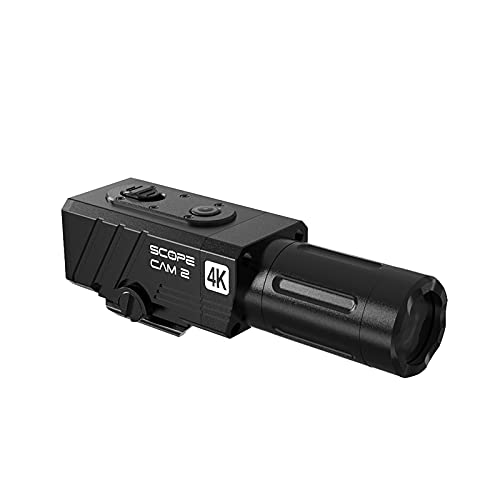
Quick Summary
The RunCam ScopeCam2 is a 4K hunting action camera with 4x digital zoom, a built-in Pica-Tiny rail mount, and WiFi app features. Its controls include a sliding record switch with vibration indication.
Key Details
| Detail | Product information and buyer relevance |
|---|---|
| Video | 4K resolution and a high frame rate; no specific frame rate is given. |
| Zoom | 4x digital zoom for capturing distant action. |
| Mount | Built-in Pica-Tiny rail mount. |
| Body and rating | Aluminum body and an IP64 rating. Do not assume the rating means the camera is suitable for submersion. |
| Controls | Slide the record switch to start recording and pull it to stop; vibration indication is included. |
| App features | WiFi connection to the RunCam App for live preview, video playback, parameter settings, downloads, and sharing. |
Key Features Explained
The digital zoom can make a distant subject appear closer in the captured view, but it does not change the camera’s stated 4K resolution. The built-in switch provides a direct way to start and stop recording, while the vibration indication provides feedback during operation.
Through WiFi, the RunCam App supports previewing and playing back video, adjusting parameters, downloading clips, and sharing them. The source does not specify a frame-rate value, so check that detail if it matters to your recording needs.
What to Compare Before Buying
- Mount fit: Confirm that the Pica-Tiny rail mount matches the exact equipment and mounting point you intend to use.
- Recording needs: Consider whether 4K resolution and 4x digital zoom suit your intended footage, and check the frame rate if you need a specific value.
- App workflow: If you plan to use WiFi features, check that the RunCam App works with your device and preferred way of handling video.
- Exposure: Treat IP64 as a specific rating, not as confirmation that the camera can be submerged.
Compatibility, Size and Fit
The description names guns, crossbows, bows, and scopes as mounting contexts. This does not establish fit with every model or rail. Confirm the mount interface on your exact equipment before choosing the camera. Follow the camera and host equipment instructions when mounting or using it.
Before You Decide
Check the rail fit, the recording specifications you need, and whether the RunCam App supports your intended workflow. The camera has an IP64 rating, but submersion suitability is not established.
Using the App to Check a Clip
For a planned recording, the RunCam App’s live preview can help check the view before recording. Playback provides a way to review the captured clip afterward.

Reviews
There are no reviews yet.