


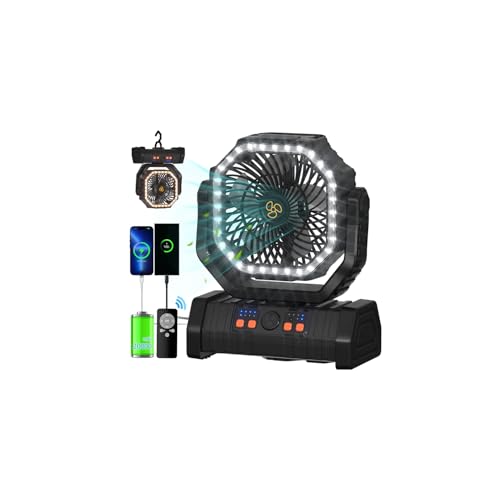
Quick Summary
The green ONLYNEW PF2S is a rechargeable camping fan with a built-in 20,000 mAh battery, an LED lantern and a hanging hook. It offers stepless fan-speed adjustment, automatic oscillation, a timer and button or remote control. The listing advertises up to 60 hours of operation.
Key Details
| Detail | Product information and buyer relevance |
|---|---|
| Model and color | ONLYNEW PF2S, green. |
| Battery | Built-in rechargeable 20,000 mAh battery; advertised for up to 60 hours of operation. |
| Fan adjustment | Stepless speed adjustment, 45° or 90° automatic oscillation, and up to 270° manual pivoting. |
| Light | Integrated LED lantern with three brightness levels. |
| Timer | Three timer options: 3, 6 or 9 hours. |
| Charging and output | USB-C input and USB-A output. The output can be used to charge a phone or another compatible device. |
| Controls and hanging | Button controls and a remote; a 360° hook allows hanging in different orientations. |
Key Features Explained
Automatic oscillation moves the fan through a 45° or 90° range; manual pivoting lets you set its direction, with the angle able to be fixed. The hook provides a hanging option, while the base controls offer an alternative to using the remote.
The lantern has three brightness levels. The remote can adjust fan speed, light brightness, timer and oscillation. Its storage slot is on the side of the base. Remove the remote’s insulating strip before use.
What to Compare Before Buying
- Runtime: Up to 60 hours is the advertised maximum. Consider whether that claim suits your planned use and whether you can recharge the fan when needed.
- Air direction: Check whether the 45° or 90° automatic oscillation range and manual pivoting meet your placement needs.
- Charging: The fan has a USB-C input and USB-A output. Check the charging equipment and device connections you intend to use; included cables or adapters are not specified.
- Light and timing: Confirm that three brightness levels and the 3, 6 and 9-hour timer options fit your plans.
Prepare a Campsite Setup
Before settling in, choose a stable place for the base or identify a suitable hanging point, then set the fan direction and light level. Keep the remote in its side slot when it is not in use. If you plan to use the USB-A output, check your device’s charging connection and requirements in advance.
Before You Decide
Confirm that the fan’s battery capacity, advertised runtime, available charging connections and timer options suit your intended use. Check whether you prefer placing it on its base or hanging it, and verify separately which charging accessories come with the selected configuration.


Reviews
There are no reviews yet.